Octave でxxx.mスクリプトファイルを実行させるには、
> xxx
とコマンド実行すればいいだけだった。
2015年12月29日火曜日

2015年12月27日日曜日
Octave でのcsvファイル読込み
Cousera Machine Learning / week1
QUIZ Linear Regression with One Variable
の問題2.で調べるのに使った。
問題はRetake毎に変わるようだ。

次のcsvファイルがあるとき
$ cat week2q2.csv
1,-890
2,-1411
2,-1560
3,-2220
3,-2091
4,-2878
5,-3537
6,-3268
6,-3920
6,-4163
8,-5471
10,-5157
次のように読み込む
octave:1> M=csvread('week2q2.csv')
M =
      1   -890
      2  -1411
      2  -1560
      3  -2220
      3  -2091
      4  -2878
      5  -3537
      6  -3268
      6  -3920
      6  -4163
      8  -5471
     10  -5157

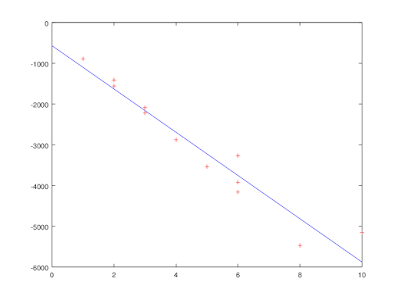
赤色「r」のマーカー「+」でプロット。
octave:2> plot(M(:,1),M(:,2),'r+')
x を0から10まで1刻みで用意
octave:3> x=0:1:10
x =
    0    1    2    3    4    5    6    7    8    9   10
y1= -569.6 - 530.9 * x;
octave:6> plot(M(:,1),M(:,2),'r+')

hold on コマンドでグラフを重ねて描く
octave:7> hold on
octave:8> plot (x, y1)
できた。
一応、ブログアップ用に画像保存
octave:9> print -dpng 'week2q2.png'

2015年12月19日土曜日
Octaveの警告pstoedit binary is not available.
Cousera Machine Learning/week2-2-4
Plotting Data
t=[0:0.01:0.98];
y1=sin(2*pi*4*t);
plot(t,y1);
y2=cos(2*pi*4*t);
重ねてグラフ表示をしたい場合
hold on
plot(t, y1, 'r');
> print -dpng 'TEST_octave.png'
と実行したら、次の警告が出てしまった。
warning: print.m: fig2dev binary is not available.
Some output formats are not available.
warning: print.m: pstoedit binary is not available.
Some output formats are not available.
CentOS7 上でOctaveを動かしていたが、グラフの保存ができないか?
yum install transfig
を実行して、警告は減ったが
warning: print.m: pstoedit binary is not available.
というエラーの方は出ている。
どうにもこの警告が消えない。
が、これは大して問題ではないようだ。
Plotting Data
t=[0:0.01:0.98];
y1=sin(2*pi*4*t);
plot(t,y1);
y2=cos(2*pi*4*t);
重ねてグラフ表示をしたい場合
hold on
plot(t, y1, 'r');
> print -dpng 'TEST_octave.png'
と実行したら、次の警告が出てしまった。
warning: print.m: fig2dev binary is not available.
Some output formats are not available.
warning: print.m: pstoedit binary is not available.
Some output formats are not available.
CentOS7 上でOctaveを動かしていたが、グラフの保存ができないか?
yum install transfig
を実行して、警告は減ったが
warning: print.m: pstoedit binary is not available.
というエラーの方は出ている。
どうにもこの警告が消えない。
が、これは大して問題ではないようだ。
登録:
投稿 (Atom)